For years, Nextbase have been a pioneer of in-car technology, with their range of dash cams giving drivers extra security and peace of mind.
Now, they’ve engineered the world’s first truly Smart Dash Cam, designed to make your vehicle smarter, safer, and more connected – Nextbase iQ. The intuitive system utilises AI and advanced technology to give you its most comprehensive safety and security system yet, helping you respond sooner to potential incidents.
It comes with a host of premium features that you won’t find on other dash cams, to make looking after your car as easy as possible. For full front, cabin and rear coverage, every Nextbase iQ model can be paired with the optional iQ Rear Camera, giving you a clearer picture of what’s happening all around your vehicle.
In this blog, we’ll explore the commonly asked questions surrounding key Nextbase iQ features and how they work, which subscription you’ll need to access them, and which iQ model could be right for your vehicle.
What is Live View and how does it work?
Live View lets you check on your vehicle in real time from your phone, wherever you are. Whether you’re parked at the airport or leaving your car overnight somewhere unfamiliar, you can see exactly what’s happening without waiting to review recorded footage.
You can access your dash cam feeds instantly through the iQ app to view what your car can see and even set up custom alerts to notify you of potential incidents.
So, instead of finding out the full story from old footage after it’s happened, you can stop it from happening in the first place.

How does RoadWatch AI help after an incident?
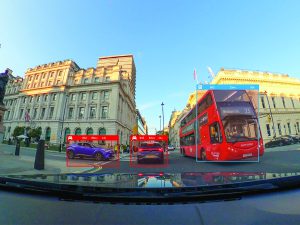
With RoadWatch AI, you can gain additional context around an incident by analysing your recorded footage. It identifies road users such as cars, buses, pedestrians and cyclists, while estimating their speed and distance to help build a clearer picture of what happened.
A big benefit of a dash cam is that it can act as an objective witness if you’re ever involved in a collision or you’re the victim of a fraudulent claim. Nextbase iQ takes this to the next level – for the first time, AI technology provides the facts to prove your version of events. The RoadWatch AI function can be applied to any of your recordings, front or back camera, to highlight key details in your recordings.
How does SmartSense Parking protect your car while it’s parked?
Leaving your car somewhere unfamiliar can be worrying, even if you have a dash cam – while it might capture footage of an incident to show you what happened, there’s nothing it can do to prevent it.
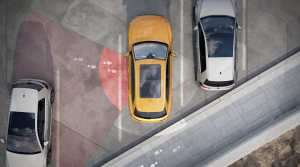
The SmartSense Parking feature of the Nextbase iQ gives you greater peace of mind by helping you stay aware of activity around your vehicle. It uses Spatial Awareness technology and a custom-trained AI to automatically detect unusual activity near your car.
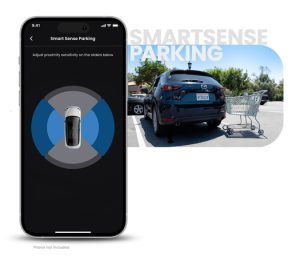
You’ll receive an instant notification, so you can check what’s happening for yourself. If it is something suspicious, you can intervene in real-time using your voice or the remote alarm to prevent anything further from happening.
Even better, you can customise the parameters to make SmartSense work for you – adjust the proximity sensitivity to take obstacles like footpaths into account, so you only get the notifications you need.
What is Witness Mode and when should you use it?
There are some situations as a driver that you’d rather not face on your own; an angry driver approaching your vehicle, or perhaps getting stopped by the police. With Witness Mode, you can quickly share what’s happening with someone you trust.
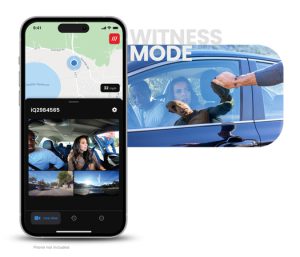
To activate it, just say “Start Witness Mode”. This will immediately start streaming your live video and audio to a chosen loved one, so they can see and hear what’s happening in real time.
How does Guardian Mode help when someone else is driving your car?
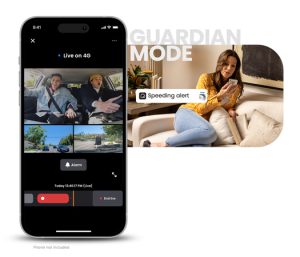
Letting someone else drive your car can be daunting – whether that’s a vehicle technician, a valet driver, or even the kids learning to drive. With Guardian Mode, you can monitor whoever’s driving your vehicle, and make sure that they’re not abusing your trust.
Set limits on the speed or location parameters they can travel within. If they exceed these limits, iQ will send you an alert so you can access the footage and see for yourself. If you need to step in, you can talk to them through the app to put yourself back in the driving seat.
How does Emergency SOS work in an accident?
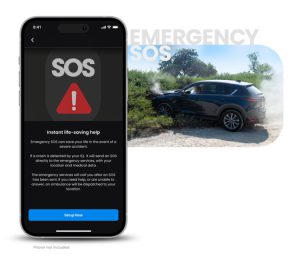
No one wants to think about being involved in a road accident. But, if the worst does happen, you want to know that someone’s coming to help. If you’re not able to make the call yourself, iQ’s Emergency SOS functionality will step in.
If you – or whoever’s driving – are unresponsive after a detected collision, iQ will automatically send your GPS location and what3words data to emergency services. You can also store vital medical data with your iQ, such as your blood type or conditions like diabetes. The dash cam will send this information to the emergency services too, so you’ll get the right help for you.
How does Automated Incident Backup protect your footage?
The footage you capture, especially of collisions, accidents, or damage, is important. That’s why Nextbase iQ automatically tags any footage that it deems to include an incident, and then uploads it securely to the cloud for you.
Do you need a subscription to use the Nextbase iQ?
The Nextbase iQ is a truly smart dash cam, and you can unlock some of its best features with a subscription plan.
iQ Solo (Free):
- Voice control.
- Real-time text notifications.
iQ Protect:
- Real-time image notifications.
- Live View.
- Smart Sense Parking.
- Witness Mode.
- Guardian Mode.
- 30 days of Cloud Storage.
iQ Protect Plus:
- Emergency SOS.
- 180 days of Cloud Storage.
- Automated incident back-up.
For more information, you can check out our advice article detailing the features of each iQ subscription plan.
Which Nextbase iQ model is right for you?
All models come with 4G and WiFi connectivity as well as an included 64GB and power cables. However, the level of detail you’ll obtain from the footage does depend on the Nextbase dash cam model you opt for.
- Choose the iQ 1K for reliable HD recording on everyday journeys.
- To capture extra detail like number plates and road signs, upgrade to iQ 2K for near quad HD.
- For the highest resolution and image quality for maximum detail, even when you miss them, iQ 4K is the right fit.
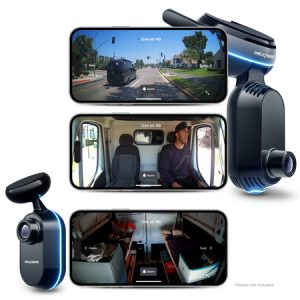
Whether you’re looking for everyday peace of mind, added protection while parked or connected safety features powered by AI, there’s a Nextbase iQ model to suit your needs. Compare the iQ 1K, 2K and 4K range online or visit your local Halfords store to speak with one of our colleagues.