Not so long ago, mobile phones were bulky, single-purpose devices. Today, smartphones are powerful, multifunctional tools that many people rely on daily — from navigation and payments to photography and fitness tracking.
With so many drivers choosing to use their phones instead of traditional sat navs, an important question arises: Sat navs vs. smartphones: Which should you use?
Can I use a mobile phone while driving?
No, you cannot use a mobile phone whilst operating a vehicle.
Laws introduced in 2021 further restrict smartphone usage while driving. Previously, it was illegal to hold your smartphone to make calls or texts while driving. However, the new law closed off a loophole that meant you could still scroll through playlists, take a photo, or even play games.
Now, you’re not allowed to hold your phone for any purpose while driving, even if you’re at traffic lights or stuck in traffic. You can still, however, use your device hands-free as long as you do not hold them at any time during usage. Hands-free access means using, for example:
- Bluetooth headset
- Voice command
- Dashboard holder or mat
- Windscreen mount
- Built-in sat nav
However, the rule applies that the device must not block your view of the road and traffic ahead.
The penalty for using your phone illegally is six points on your license and a £200 fine, meaning that you’d only need to commit the offence twice before losing your license, or just once if you’ve had your license for less than two years. With bills rising and the cost of living hitting hard, we’re sure you’ll be wanting to avoid any unexpected fines, so sat navs are the way to go.
Can I use my phone as a sat nav?
Yes, it’s legal to use a smartphone as a sat nav, but only if it’s held in a cradle which most phones don’t arrive with. Instead, you’ll have to purchase this separately. However, when you buy a sat nav, it will arrive with a mount so you can securely attach it in a safe location.
Why are sat navs better for navigation than smartphones?
While there are lots of navigational apps available on mobile phones, sat navs still have the edge over smartphones in a number of ways including bigger screens, longer battery life and more. Here are just a few reasons why you should still use a sat nav instead of a smartphone.
Larger screens
- Sat navs have bigger, high-quality displays (e.g., TomTom GO Discover 5”) for easier map reading
- Smartphones’ small screens can be hard to follow when mounted low on the windscreen
Which leads us neatly to our next point. There are no specific laws on where a device should be mounted. However, it’ll need to be placed somewhere where it doesn’t impede your view of the road. Generally, we’d advise mounting it at the bottom right of your windscreen.

Of course, smartphones only have small screens, so following a map while your phone is mounted here can be tricky. This isn’t a problem you’ll have with a sat nav.
Most modern sat navs benefit from large, high-quality screens. Take the TomTom GO Discover 5” for example. Its impressive 5-inch display provides exceptional picture clarity, so you’ll have no problems following the on-screen directions. Plus, throughout the TomTom GO Discover, GO Expert and GO Classic ranges, you’ll find lots of different screen sizes. So, you can find the size that works best for you!
They save your data
- Sat navs store maps onboard; no need for data downloads
- Works in areas with poor or no mobile signal
- Many include regular map and traffic updates (Garmin, TomTom)
Don’t want to drain your phone’s data? Choose a sat nav!
Maps are saved on a sat nav, so there’s nothing to download. If you find yourself in an area with no mobile internet signal, your sat nav won’t leave you in the dark like a phone might.

Many modern sat navs like the Garmin Drive 52 EU and Garmin DriveSmart 66 also include regular map updates – important as our roads are constantly changing.
If you want the whole package, look out for a sat nav that includes traffic updates too. Many top brands like Garmin and TomTom have specialised traffic systems that provide real-time updates.
Your battery will last longer
- Smartphones drain battery quickly with GPS, internet, and screen usage
- Sat navs are usually powered through the car; some can be hardwired for continuous use
Almost all sat navs will need to be plugged in while they’re being used – although some will have built-in batteries to help you find your way to your destination.
However, even if your phone is plugged in, the extra resources needed to keep the screen, GPS and internet running can make your phone’s battery drain faster than it charges.
By using a sat nav, you don’t have to worry about making sure your phone has some battery left for the drive home, or that it will run out of juice before you know where you are.
Why get your sat nav professionally hardwired?
Here at Halfords, we can professionally hardwire your sat nav so that it’s always connected to your vehicle’s energy supply. This way, you won’t need to worry about plugging it in every time you get in your car or forgetting and running out of battery.
Through this service, your sat nav’s cables will be neatly wired around the dashboard and any trims and fed directly into your vehicle’s energy supply. The job will be carried out by one of our trained experts and they won’t need to dismantle your car’s interior or make any permanent changes.
It’s that simple! You can learn more about our sat nav installation service here.
Multi-functional sat navs
Sat navs are more capable than ever before. Modern multi-functional sat navs offer extras like:
- TripAdvisor ratings for nearby attractions
- Up Ahead stops for food, fuel, and milestones
- Parking availability updates
- Roadtrip routes for campervans and scenic trips

Want to turn your journey into an adventure? No problem! Many modern sat navs have lots of features that will help you find and explore new places along a route. Not only this, but they can also make your journey easier and more stress-free. Here are just a few features you’ll find on modern sat navs:
- TripAdvisor Traveller ratings – Available on a range of Garmin devices, this helps you find the best-rated places to visit along your route.
- Up Ahead – The Up Ahead feature shows upcoming stops for food, fuel, and other milestones such as cities. Available on the Garmin Drive 52 EU Sat Nav, it’s great when you need to factor in any unplanned stops.
- Parking availability – With the TomTom Go Discover 5”, you benefit from one year of free parking updates. So, if you’re in a new city or town, you can easily find the nearest car parks with available spaces.
- Roadtrip Routes – Specially designed for campervans, the Garmin Camper 795 Sat Nav has a directory of campsites and services, and see suggestions for alternate scenic routes so you can enjoy an unplanned adventure.
Specialised sat navs
HGV and larger vehicle sat navs like the TomTom GO Expert Plus 7” allow input of weight, height, and length to avoid restricted routes and low emission zones.
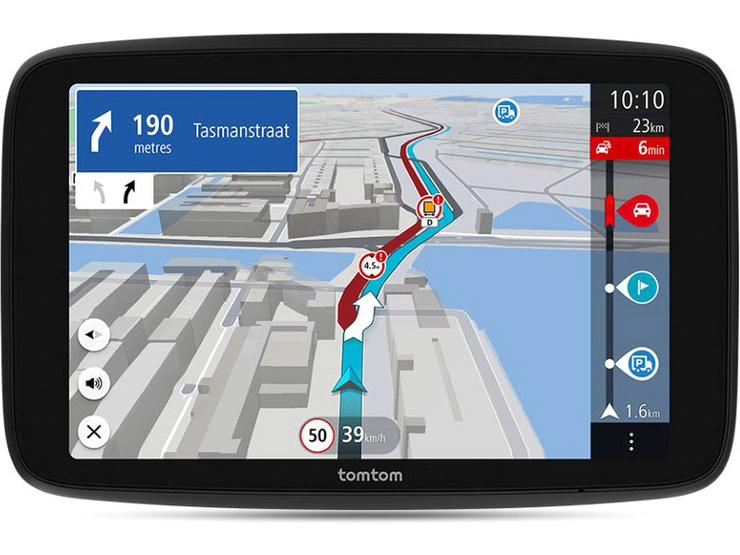
What about navigation for larger vehicles? HGVs often can’t travel on the same roads that cars can, but many smartphone apps don’t have a function to cater for this. Luckily, there are HGV-specific sat navs available like the
Through this, you can input your vehicle’s weight, height and length, and the sat nav will automatically find an appropriate route. Worrying about low bridges or inaccessible roads will be a thing of the past! And, as you’d expect, the sat nav comes with a host of features including the most up-to-date world maps available and traffic warnings.
While a smartphone may feel like a convenient choice, it’s still worth investing in a sat nav for all your navigational needs. If you need any help finding the perfect sat nav, head over to our Sat Nav Buyer’s Guide. You can also explore our full range of sat navs here.
Here at Halfords, we’re committed to driving down prices and offering you the best value possible to keep you safe, happy, and secure. We’ve pledged to never be beaten on price on 1000s of motoring essentials, including in-car tech – read more here.